


The corporate portrait onboarding process is a structured workflow that integrates professional employee headshots into new hire programs to build brand consistency from day one. When a new employee’s portrait appears in the company directory, on LinkedIn, and in email signatures before their first week ends, the organization signals credibility to clients, colleagues, and partners alike. HR professionals and corporate managers who treat employee onboarding photos as a core deliverable, not an afterthought, gain a measurable advantage in brand alignment and internal cohesion. Metroplex Headshots works with companies across industries to make this process repeatable, professional, and scalable.
What is the corporate portrait onboarding process and why does it matter?
The corporate portrait onboarding process is the practice of collecting, standardizing, and deploying professional employee portraits as part of a structured new hire workflow. It is the visual equivalent of issuing a badge or setting up a company email. Without it, organizations accumulate a patchwork of selfies, outdated photos, and missing profile images that erode brand professionalism over time.
Uniform corporate headshots reduce visual noise and improve how visitors and internal teams scan directories and team pages. That consistency reflects directly on company credibility. A client visiting your website should see a cohesive team, not a collection of photos taken across a decade with wildly different backgrounds, lighting, and attire.
The business case for standardized employee portrait photography goes beyond aesthetics:
- Brand alignment: Consistent portraits reinforce your visual identity across LinkedIn, the company website, and internal tools.
- Employee recognition: Clear, current photos help colleagues identify one another, especially in distributed or hybrid teams.
- Executive presence: Well-produced portraits signal that the organization invests in its people and its image.
- Client trust: Corporate photos matter because prospective clients form impressions before a single conversation takes place.
- Directory completeness: Incomplete profile photos create gaps that make teams look understaffed or disorganized.
The standard industry term for this practice is “corporate portrait integration,” though HR teams often refer to it simply as the employee headshot workflow. Both terms describe the same goal: every new hire arrives with a professional, brand-aligned portrait ready to deploy.
How do AI headshot tools change the employee portrait workflow?
AI headshot generators have fundamentally changed what is possible for distributed and remote teams. AI headshot tools now enable remote new hires to generate professional corporate portraits from smartphone selfies without travel or studio scheduling. That means a new hire in Austin, a contractor in Chicago, and a remote employee in rural Montana can all appear in the company directory with consistent, professional portraits on day one.
The efficiency gains are real. Enterprises that integrate AI headshot generators into preboarding steps report profile completion rates climbing from roughly 60% to 95%. That jump represents a near-complete team directory instead of a half-finished one. For HR managers overseeing large cohorts, that difference is significant.
“A disciplined, systematic portrait production process is more effective than ad hoc photoshoot efforts in maintaining brand consistency over time. The organizations that treat portrait collection as a repeatable system, not a one-time event, are the ones whose team pages still look sharp three years later.”
AI tools also address a common pain point: low-quality or poorly cropped source photos. Automated tools can restore missing shoulder elements or replace inconsistent backgrounds to produce uniform portraits. This reduces post-processing time compared to manual editing and standardizes visual identity across platforms.
That said, AI headshots are not a universal replacement for professional photography. Traditional photoshoots provide the greatest creative direction and control, making them ideal for executive hero portraits and brand campaign imagery. Hybrid approaches balance brand needs with operational realities. AI handles volume and speed for distributed teams; professional sessions handle depth and nuance for leadership.

What best practices should HR follow for a smooth portrait onboarding workflow?
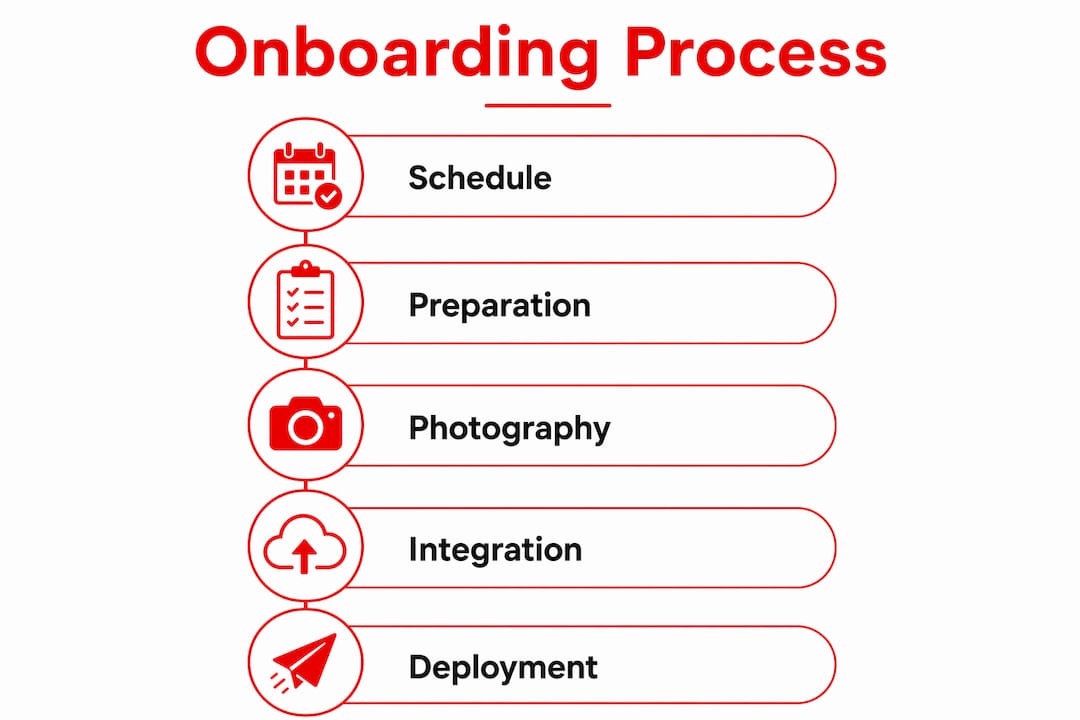
A repeatable portrait workflow removes guesswork and protects brand consistency as your team grows. The following steps build a process that works whether you are onboarding five people or five hundred.
- Create a business portrait style guide. Define background color, attire expectations, lighting standards, and acceptable image dimensions before the first photo is taken. A written guide prevents the “everyone interpreted it differently” problem that plagues ad hoc portrait programs.
- Send photo requirements before the start date. Include the style guide in preboarding communications alongside tax forms and IT setup instructions. New hires who know what is expected arrive prepared, not surprised.
- Schedule portrait sessions during week one. Treat the headshot appointment the same way you treat orientation. Block time on the calendar and make attendance expected, not optional.
- Use a review workflow before publishing. Assign one person, typically a brand manager or HR coordinator, to approve portraits before they go live in directories or on the website. This single checkpoint prevents off-brand images from slipping through.
- Establish a refresh cadence. A biannual or quarterly headshot refresh is recommended to maintain recognition and avoid outdated portraits causing identification errors. Build this into your annual HR calendar.
- Build a remote portrait protocol. For hybrid and fully remote employees, provide a detailed self-shoot guide or access to an AI headshot tool. Specify the exact background, lighting setup (natural light facing a window works well), and file format required.
Pro Tip: Send new hires a one-page “headshot prep card” with three bullet points: what to wear, where to stand, and what file format to submit. Reducing friction at the submission stage dramatically improves compliance rates.
Managing the refresh cycle is where most programs fall apart. HR teams launch a portrait initiative, collect photos during onboarding, and then let the library go stale for years. A systematic portrait production approach treats the library as a living asset, not a one-time project.
How do you deploy corporate portraits across communication channels?
Collecting portraits is only half the job. Deploying them correctly across every channel is where brand alignment either holds or breaks down. Consistent corporate portraits across LinkedIn, internal directories, and email signatures improve brand professionalism and employee recognition. Careful export sizes and naming conventions enhance deployment efficiency.
The table below outlines recommended image specifications for the most common deployment channels:
| Channel | Recommended Size | File Format | Key Consideration |
|---|---|---|---|
| LinkedIn profile | 400 x 400 px minimum | JPG or PNG | Square crop, face centered |
| Company website | 800 x 800 px | JPG | Consistent background color |
| Internal directory | 200 x 200 px | JPG or PNG | Uniform framing and scale |
| Email signature | 100 x 100 px | JPG | Small file size for load speed |
| Press or media kit | 1,200 x 1,200 px | PNG or TIFF | High resolution for print use |
Naming conventions matter more than most HR teams realize. A file named “IMG_4823.jpg” creates chaos in a shared folder. A file named “Smith_Jane_Headshot_2026.jpg” is searchable, sortable, and immediately useful. Establish the naming convention in your style guide and enforce it at the submission stage.
Pro Tip: Create a shared folder structure organized by department and year. When the refresh cycle comes around, you can compare current and previous portraits side by side to catch visual drift before it becomes a brand problem.
The corporate photography workflow for deployment should also account for timing. Portraits should go live in all channels simultaneously, not rolled out piecemeal over weeks. A new hire who appears on the website but not in the internal directory creates confusion. Batch publishing on a set date keeps the experience consistent.
Key Takeaways
A structured corporate portrait onboarding process is the single most effective way to build brand consistency, improve directory completeness, and signal professionalism to clients and colleagues from day one.
| Point | Details |
|---|---|
| Start with a style guide | Define background, attire, and dimensions before collecting any photos. |
| Integrate portraits into preboarding | Send photo requirements alongside tax forms so new hires arrive prepared. |
| Use AI tools for remote teams | AI headshot generators raise profile completion rates and eliminate scheduling barriers. |
| Deploy across all channels at once | Simultaneous publishing prevents directory gaps and brand inconsistency. |
| Refresh portraits on a set cadence | Biannual or quarterly updates prevent outdated images from causing recognition errors. |
What I have learned about portrait onboarding after years in the field
I’m Traci Schowmeyer, and the pattern I see most often is this: HR teams treat the portrait as the last item on the onboarding checklist, not the first. That one decision costs organizations more than they realize.
When a new hire’s photo is missing from the directory on day one, it sends a quiet signal to the rest of the team that this person is not fully “in” yet. That is not the welcome message any HR leader intends to send. The portrait is not decoration. It is the employee’s first digital handshake with every colleague and client they have not yet met in person.
The other mistake I see is treating AI headshot tools and professional photography as an either/or choice. They are not. AI tools are excellent for volume, speed, and remote accessibility. Professional sessions, like those Metroplex Headshots provides, are irreplaceable for executive portraits, brand campaigns, and situations where creative direction and quality control matter most. The organizations that get this right use both, matching the tool to the need.
My honest advice to HR managers: build the portrait workflow before you need it. Document the process, assign ownership, and schedule the refresh cycle on the calendar now. A portrait program that runs on autopilot is worth ten times more than one that requires a heroic effort every time a new cohort joins.
— Traci Schowmeyer
How Metroplex Headshots supports your corporate portrait program
Corporate portrait programs succeed when the photography behind them is consistent, professional, and built for real business use. Metroplex Headshots specializes in exactly that, working with HR teams and corporate managers to produce portraits that align with brand guidelines and hold up across every channel.
Whether you are onboarding a single executive or a team of fifty, Metroplex Headshots offers national headshot services designed to fit your workflow, not the other way around. The process is built to integrate with your onboarding timeline, so portraits are ready when your new hires are. For HR leaders ready to treat corporate photography as the branding investment it is, explore the corporate photography workflow Metroplex Headshots has refined for business teams of every size.
FAQ
What is a corporate portrait onboarding process?
A corporate portrait onboarding process is a structured workflow that collects, standardizes, and deploys professional employee headshots as part of new hire integration. It ensures every employee appears consistently across directories, websites, and communication channels from day one.
When should new hires get their corporate headshots taken?
New hire portraits should be scheduled during the first week of employment, ideally as a calendar-blocked appointment alongside orientation. Sending photo requirements during preboarding further reduces delays.
How often should corporate headshots be refreshed?
A biannual or quarterly refresh cadence is recommended to prevent outdated portraits from causing recognition errors and brand inconsistency. Building this schedule into the annual HR calendar keeps the portrait library current without requiring a reactive effort.
Can AI headshot tools replace professional photography for onboarding?
AI headshot tools excel at speed and volume for distributed or remote teams, but traditional professional sessions provide greater creative control for executive portraits and brand campaigns. A hybrid approach serves most organizations best.
What image size should HR use for employee portraits on LinkedIn?
LinkedIn recommends a minimum of 400 x 400 pixels in JPG or PNG format, with the face centered in a square crop. Consistent sizing and framing across all employee profiles strengthens the organization’s visual identity on the platform.

