What scalable corporate photography really means for your organization
Scalable corporate photography is a systemized approach to producing professional images across large or growing organizations, where consistency, speed, and brand alignment are built into the process rather than left to chance. It is not a single shoot or an annual event. It is a repeatable program that produces the right images, in the right formats, for the right channels, every time a new hire joins or a campaign goes live.
The core difference between ad hoc photography and a truly scalable program comes down to infrastructure. A strategic photography program maps images to specific channels, builds repeatability into every shoot, and creates measurable output tied to business goals. That means your website, LinkedIn profiles, investor decks, recruiting pages, and internal directories all draw from the same governed asset library rather than a patchwork of inconsistent files.
For corporate communications and HR managers, the practical building blocks of a scalable program include:
- Unified style guidelines covering background, lighting, posing, and attire
- Documented workflows from scheduling through post-production and delivery
- Technology integration with platforms like Slack, Microsoft Teams, and your HRIS
- A Digital Asset Management (DAM) system as the single source of truth for all photo assets
- Defined roles across HR, communications, IT, and photography vendors like Metroplex Headshots
When these elements work together, your organization can photograph 50 employees or 5,000 without the output looking like it came from five different companies.
Why fast-growing companies struggle to scale corporate photography
Growth exposes every gap in your photography process. A company that photographs 30 employees a year can manage shoots informally. One that onboards 300 faces a different problem entirely.
The most common friction points include:
- Scheduling complexity across multiple offices, time zones, and remote workers who cannot attend on-site shoots
- Style drift, where photos taken six months apart look like they belong to different brands because no written standard exists
- Workflow bottlenecks when approvals require multiple stakeholders and no clear process governs who signs off
- Inconsistent asset storage, leaving images scattered across shared drives, email threads, and personal folders
- Delayed image availability, which means new hires appear in directories and on websites without a photo for weeks or months
The brand cost of inconsistency adds up fast. Standardized corporate headshots strengthen brand recognition, build stakeholder trust, and create a sense of unity across global teams. When headshots look mismatched, that dissonance signals disorganization to clients and candidates alike.
Quality control is another persistent challenge. Without a defined review checkpoint, images that do not meet brand standards slip through, and correcting them after distribution is far more expensive than catching them before delivery.
How to establish style guidelines that hold up across every location
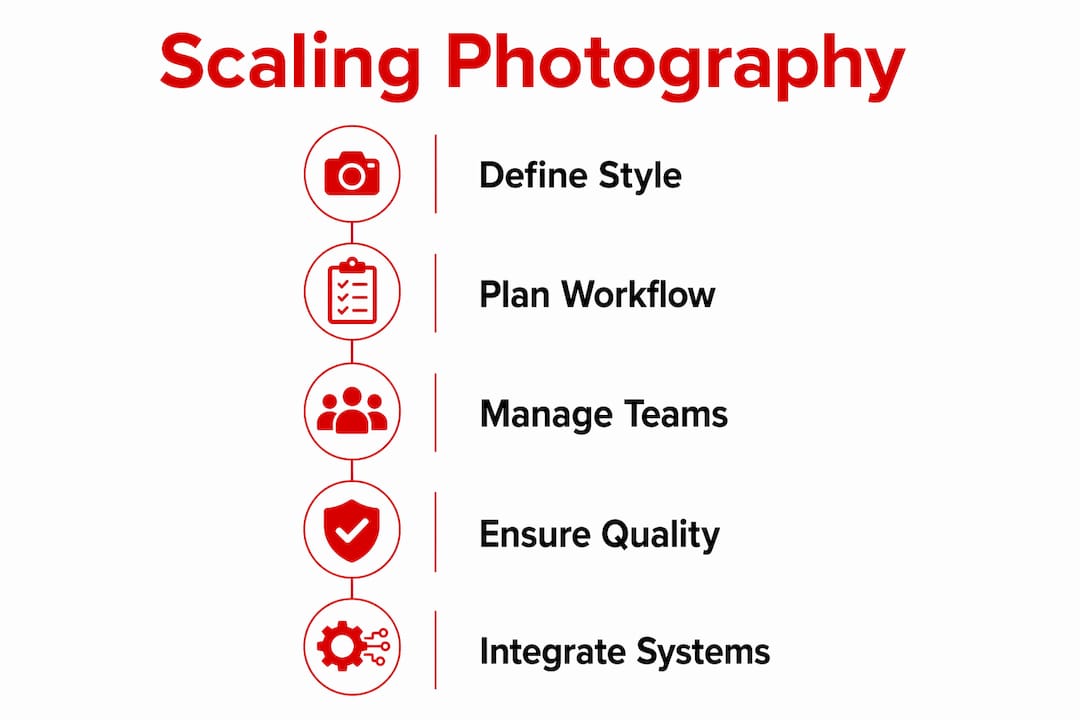
Style guidelines are the foundation of brand consistency in corporate photography. Without them, every photographer, every office, and every shoot makes independent decisions that compound into visual drift over time.
A strong style guide covers these elements explicitly:
- Background: specify the exact color, texture, or environment (solid gray, white seamless, branded office backdrop)
- Lighting: define the setup type, such as three-point studio lighting or natural window light, and the mood it should produce
- Framing and crop: set the head-to-frame ratio, eye-line placement, and whether the shot is a tight headshot or a three-quarter frame
- Attire standards: clarify whether business formal, business casual, or brand-colored clothing applies, and what to avoid
- Retouching parameters: document what post-production adjustments are acceptable and what crosses into misrepresentation
- File format and resolution: specify delivery specs for web, print, and internal directories separately
Corporate headshots communicate company culture and brand values, not just individual identity. That is why the style guide must be treated as a living document, reviewed at least annually and updated whenever brand standards change.
Distribute the guide to every photographer, internal or freelance, before any shoot begins. Pair it with reference images showing approved and rejected examples. A written standard without visual references leaves too much room for interpretation.
Pro Tip: Create a one-page “shoot brief” that distills your full style guide into a quick-reference checklist. Photographers can confirm compliance before the first frame, and HR coordinators can use it to verify setup before the shoot begins.
The operational workflow that makes large-scale photography manageable
A repeatable workflow is what separates a photography program from a photography event. Enterprises delivering consistent headshots at scale require repeatable legal, design, and delivery processes to reduce cost and improve adoption across large teams.

The workflow breaks into four phases:
Phase 1: Planning
- Confirm shoot dates, locations, and participant lists with HR and department leads
- Distribute style guides and shoot briefs to all photographers
- Run preflight checks on lighting, backgrounds, and equipment using standardized scripts
- Capture consent forms and set automated retention schedules for compliance
Phase 2: Shoot execution
- Use AI-assisted framing tools to normalize head crop and posture across all subjects, reducing manual editing time
- Assign a coordinator at each location to manage timing and confirm each participant meets attire standards before sitting
Phase 3: Post-production
- Apply batch editing presets that enforce color grading and retouching parameters from the style guide
- Route images through a defined approval checkpoint before any file leaves post-production
Phase 4: Asset delivery
- Upload approved files to your DAM system, which serves as the source of truth for storage, versioning, and access control
- Export in all required formats simultaneously using automated CI-based export pipelines
For a detailed breakdown of how these phases connect in practice, the corporate photography workflow guide from Metroplex Headshots walks through each stage with specific role assignments.
Pro Tip: Build your approval checkpoint into your project management tool rather than email. A Slack or Teams channel dedicated to photo review keeps feedback threaded, timestamped, and searchable, which matters when you are processing hundreds of images across multiple reviewers.
Cost considerations and risk management you need to plan for
Budgeting for a corporate photography program at scale requires separating fixed costs from variable ones. Getting that structure wrong is one of the most common reasons programs stall after the first year.
Fixed costs typically include:
- In-house photographer salaries, equipment, and software licenses
- DAM platform subscriptions for asset storage and access management
- Style guide development and initial template creation
Variable costs scale with volume:
- Agency or freelance fees for high-stakes shoots, complex productions, or overflow capacity
- Travel and logistics for multi-location shoots
- Post-production labor when batch automation does not cover all editing needs
Managing the mix of in-house teams and agencies is the most cost-effective model for large organizations. Keep recurring, predictable content production in-house and outsource technically demanding or high-visibility shoots to specialized vendors.
AI-generated headshots carry real brand risk. As of 2024, 65% of organizations regularly used generative AI for visuals, nearly double the prior year. The practical implication is not to replace photography wholesale. Reserve custom photography for high-trust assets like executive portraits, where authenticity directly affects credibility, and use AI or stock only where scale matters more than proof.
Compliance costs are often underestimated. Automated consent tracking and retention scheduling reduce legal exposure and keep your program aligned with privacy regulations. Build these into your workflow from day one rather than retrofitting them after a compliance review. For a fuller picture of what a photography investment returns, the corporate photography ROI guide from Metroplex Headshots covers the financial case in detail.
How to integrate corporate photography with your enterprise systems
The real efficiency gain in a mature photography program comes from connecting your photo assets to the systems your organization already uses. Employees who upload photos during onboarding automatically update their presence across Slack, Teams, HRIS records, and public-facing websites when the integration is configured correctly. That single upload replaces what used to be a manual update across four or five separate platforms.
Key integration best practices include:
- HRIS connection: link your photo asset pipeline to your HR system so that approved headshots populate employee records automatically at onboarding
- Slack and Teams sync: configure profile photo updates to pull from the approved asset library rather than allowing employees to upload personal photos that break visual consistency
- Metadata tagging: tag every image with employee ID, department, shoot date, and approval status so retrieval is fast and version control is automatic
- Access governance: set role-based permissions in your DAM so that only authorized users can publish, replace, or archive images
- Consent management: store consent records alongside the corresponding image files so that privacy audits are straightforward
Pro Tip: Assign a single integration owner, typically someone in IT or HR operations, who is accountable for keeping the photo pipeline connected to your HRIS. Without a named owner, integrations degrade quietly as systems update and API connections break.
Traci Schowmeyer at Metroplex Headshots emphasizes that the digital handshake between a professional image and the platforms where it appears is where brand alignment either holds or falls apart. A photo that looks polished in isolation but appears cropped incorrectly in your Teams directory or pixelated on your website has failed its purpose. Getting the profile image quality right across every channel requires both technical spec discipline and a governed delivery pipeline.
Best practices for managing photographer teams and freelancers at scale
Running a photography program across multiple vendors and locations requires the same rigor you would apply to any distributed production team. The photographers delivering your images are brand ambassadors in the room, and how you manage them directly affects output quality.
Start with a vetted roster. Maintain a pre-approved list of photographers, both staff and freelance, who have been briefed on your style guide and have delivered compliant work before. Pulling from an unknown vendor for a last-minute shoot is where visual drift starts. Metroplex Headshots, for example, offers national headshot services that bring consistent production standards to corporate programs across locations, which removes the vendor-vetting burden for multi-city shoots.
Brief every photographer the same way, every time. Use a standardized shoot brief that includes the style guide, a reference image set, the delivery spec sheet, and the consent capture process. A photographer who has worked with you before still gets the same brief. Standards erode when familiarity replaces documentation.
For freelancers specifically, build a clear contract that covers image rights, delivery timelines, retouching scope, and confidentiality. Ambiguity in any of these areas creates disputes that delay asset delivery and expose your organization to IP complications.
Conduct a post-shoot debrief after every engagement, even a short one. Note what worked, what required correction, and whether the photographer should remain on the approved roster. That feedback loop is what keeps your vendor pool sharp over time.
Strategies for ensuring quality control and brand alignment across many photos
Quality control at scale is a process problem, not a talent problem. Even skilled photographers produce inconsistent results when the review system is unclear or the approval chain is too long.

The most effective quality control structure uses three checkpoints. The first happens before the shoot: confirm that the setup matches the style guide before the first frame. The second happens immediately after the shoot: the lead photographer or coordinator reviews a sample set on-site and flags any images that need a reshoot while the subject is still available. The third happens in post-production: a designated reviewer compares the edited batch against the reference images in the style guide before any file is approved for delivery.
Batch review tools within your DAM system can accelerate this process considerably. Rather than opening individual files, reviewers work through a grid view where deviations in background, crop, or lighting are immediately visible by comparison. For teams managing cohesive corporate photography across multiple style options, tagging images by style category in the DAM makes compliance checks faster and more consistent.
Brand alignment goes beyond technical correctness. A photo can be perfectly lit and correctly cropped but still feel off-brand if the subject’s expression reads as unapproachable or the attire does not match the company’s culture. Include a brief on expression and energy in your shoot brief, not just technical parameters. The goal is a photo that functions as a digital handshake with every client, candidate, and stakeholder who sees it.
What successful scalable corporate photography looks like in practice
The clearest sign that a corporate photography program has matured is when photography stops being a project and becomes a process. New hires get photographed during onboarding week. Images are approved, tagged, and live in the directory within 48 hours. The DAM library stays current without a quarterly scramble to identify who is missing a photo.
Organizations that reach this stage share a few common characteristics. They have a written style guide that every photographer receives before any shoot. They have a DAM system with metadata tagging that makes retrieval fast and version control automatic. They have an HRIS integration that pushes approved photos to Slack, Teams, and the company website without manual intervention. And they have a named owner for the program, typically in HR or communications, who reviews the process quarterly and catches drift before it compounds.
The bio link image quality issue that plagues individual professionals at scale becomes a systemic brand problem for organizations. When a prospective client or top candidate visits your team page and sees a mix of studio portraits, webcam screenshots, and missing photos, the message is clear: this organization does not have its act together. A governed photography program eliminates that impression entirely.
For organizations building this capability for the first time, the practical starting point is a pilot with one department or location. Document the workflow, identify the friction points, and refine the process before rolling it out company-wide. That approach produces a program that actually holds up at scale rather than one that works once and then quietly falls apart.
Key Takeaways
Scalable corporate photography requires a governed system of style standards, repeatable workflows, and enterprise integrations to maintain brand consistency across large or distributed teams.
| Point | Details |
|---|---|
| System over events | A scalable program maps images to channels and builds repeatability, unlike ad hoc shoots. |
| Style guides prevent drift | Written standards covering background, lighting, crop, and attire must go to every photographer before every shoot. |
| DAM is the source of truth | A Digital Asset Management system governs storage, versioning, access control, and brand compliance across all photo assets. |
| HRIS integration multiplies efficiency | Connecting your photo pipeline to your HRIS, Slack, and Teams automates updates across platforms from a single approved upload. |
| AI supplements, not replaces | With 65% of organizations using generative AI for visuals as of 2024, custom photography remains essential for high-trust assets like executive portraits. |
Ready to build a photography program that holds up at scale? Metroplex Headshots works with corporate communications and HR teams to deliver consistent, brand-aligned headshots across organizations of any size. Whether you need a single executive session or a national headshot program coordinated across multiple locations, the process is built to produce images that work across every channel your brand touches. Explore what a professional session looks like and view headshot examples to see the standard your team’s photos can meet.