


Your corporate profile image is the digital handshake that happens before you say a single word. To improve corporate profile image quality, you need three things working together: the right technical specifications, a professional photo session, and consistent usage across every platform where your brand appears. LinkedIn data shows profiles with professional photos receive up to 21x more views and 36x more messages than profiles without photos. That gap is not a minor advantage. It is the difference between being found and being invisible.
What technical standards define a high-quality corporate profile image?
A high-quality corporate profile image, also called a professional portrait in industry practice, meets specific technical thresholds before any creative decisions matter. Skipping the technical foundation produces photos that look sharp on a phone screen but fall apart on a desktop monitor or a printed sales deck.
Resolution and format requirements
LinkedIn recommends a minimum resolution of 400×400 pixels for profile photos. That is the floor, not the ceiling. For images used across websites, annual reports, and printed materials, 1,000×1,000 pixels or higher gives you flexibility without sacrificing quality. Save files as JPEG for standard web use and PNG when you need a transparent background or higher fidelity for print.
Compression is where most corporate images quietly fail. Over-compressed JPEGs introduce artifacts around hair, collar edges, and facial features. Use a compression quality setting of 80–90% in any editing application to balance file size and visual clarity.
Platform-specific sizing at a glance
| Platform | Recommended Size | Aspect Ratio |
|---|---|---|
| 400×400 px minimum | 1:1 (square) | |
| Google Business Profile | 250×250 px minimum | 1:1 (square) |
| Corporate website (bio) | 800×800 px or larger | 1:1 or 4:5 |
| Email signature | 100×100 px | 1:1 (square) |
| Printed materials | 300 DPI minimum | Varies by layout |
Composition, lighting, and brand consistency
The 2/3 framing rule places your subject’s eyes at roughly two-thirds up the frame. This creates visual balance and draws attention to the face, which is where trust signals originate. Backgrounds should be neutral or on-brand. A cluttered background competes with the subject and dilutes executive presence.

Lighting is non-negotiable. Flat, overhead office lighting creates harsh shadows under the eyes and chin. A three-point lighting setup, using a key light, fill light, and back light, produces the even, dimensional look that reads as professional across all screen sizes. Color consistency across your team’s photos reinforces brand alignment and signals organizational discipline.
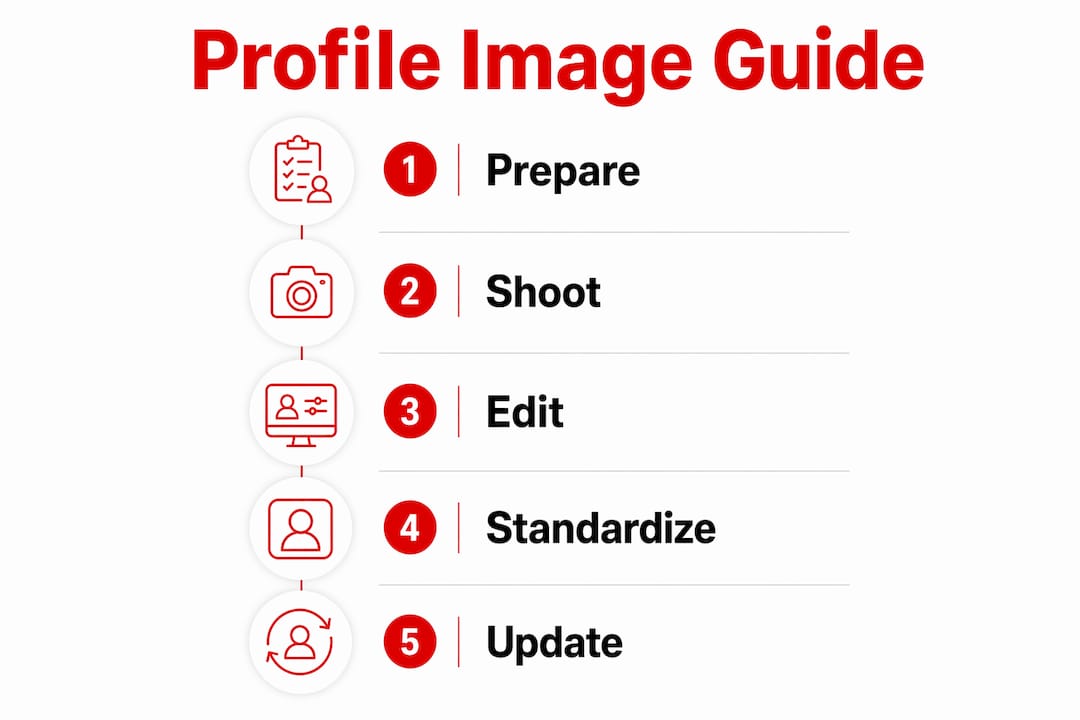
How to prepare and conduct a professional corporate photo session
Preparation determines 80% of the outcome before the camera shutter fires once. Professionals who walk into a session without preparation produce images that require heavy retouching or reshoots.
Pre-session preparation
- Confirm your wardrobe at least 48 hours before the session. Solid colors photograph better than busy patterns. Navy, charcoal, and deep burgundy read as authoritative on screen. Avoid white near the face, as it reflects light unevenly.
- Schedule grooming appointments two days before, not the morning of. Haircuts and color treatments need time to settle. Fresh cuts can look too sharp or uneven under studio lighting.
- Review the photographer’s portfolio for corporate work specifically. A photographer skilled in weddings or product photography does not automatically understand executive presence or brand alignment. Use the corporate headshot vendor selection guide to evaluate candidates with the right criteria.
- Communicate your brand guidelines to the photographer in advance. Share your company’s color palette, any background preferences, and examples of existing team photos so the new images integrate cleanly.
- Plan for multiple expressions and angles. A single pose limits your options. Capture at least three expressions, approachable, confident, and direct, and two angles, straight-on and a slight turn, to cover different use cases.
- Build in time for test shots and immediate review. The first 10 minutes of any session are calibration. Review test shots on a laptop or large monitor, not just the camera’s rear screen, to catch focus and lighting issues before the full session runs.
Pro Tip: Bring a lint roller, a small mirror, and a pressed backup shirt to every session. Small wardrobe issues that are invisible in person become the first thing a viewer notices in a close-cropped headshot.
The right background setting matters as much as the subject’s appearance. A plain studio backdrop in a neutral tone works for most corporate environments. On-location backgrounds, such as a modern office interior or a branded wall, add context but require more lighting control. Work with your photographer to test the background under actual session lighting before committing.
How to optimize and standardize corporate profile images across platforms
Shooting great photos is only half the work. Consistent and current team photography improves brand cohesion across every touchpoint, from LinkedIn to sales proposals to the company website. Without a standardization process, visual drift sets in within months.
Post-processing essentials
- Brightness and contrast: Adjust brightness so the face is well-lit without blowing out highlights. A slight contrast boost adds dimension without making the image look over-processed.
- Sharpening: Apply light sharpening to the eyes and collar. Over-sharpening the entire image creates an artificial, plastic look that undermines credibility.
- Color grading: Apply a consistent color grade across all team photos. Even a subtle warm or cool tone applied uniformly creates visual cohesion when photos appear side by side on a team page.
- Cropping: Crop all images to the same aspect ratio and framing depth before uploading. A mix of tight headshots and wide torso shots on the same team page looks disorganized.
- File naming: Use a consistent naming convention such as “LastName_FirstName_Year_Headshot.jpg” to simplify asset management and version control.
Pro Tip: Create a shared brand asset folder with pre-approved, correctly sized versions for each platform. This removes the guesswork for employees uploading their own photos and prevents off-brand cropping.
Google Business Profiles with photos receive 42% more direction requests and 35% more website clicks than profiles without photos. That data applies directly to how you prioritize photo uploads across every business listing your company maintains. Upload the highest-resolution version the platform accepts, then let the platform compress it rather than pre-compressing aggressively yourself.
A corporate photo policy formalizes update schedules, approved styles, and upload standards company-wide. Without a written policy, photo libraries become inconsistent within a year as new hires use different styles and tenured employees keep outdated images. Build the policy around an annual professional session with quarterly candid updates, which is the recommended photography cadence for maintaining authenticity and relevance.
What are the most common corporate profile image quality problems?
Most corporate image quality problems fall into predictable categories, and each has a clear fix.
Blurriness almost always traces back to two causes: insufficient resolution at upload or camera motion during the shoot. If an existing photo looks blurry, check the original file size. An image under 200 kilobytes is likely too compressed for platform use. Request the original high-resolution file from the photographer or schedule a reshoot.
Inconsistent photo styles across a team page signal a lack of brand discipline. When one executive has a dark studio background, another has an outdoor shot, and a third has a casual smartphone photo, the cumulative effect undermines the organization’s credibility. Face images create trust signals processed before any copy is read. Mismatched or outdated photos hurt that trust before a prospect reads a single word of your bio.
Outdated images are more common than most leaders realize. About 45% of LinkedIn members have no profile photo, and half of those who do have not updated in over three years. An image that no longer resembles the person creates a credibility gap in face-to-face meetings and video calls.
Pixelation on platforms happens when a low-resolution image is displayed at a larger size than its pixel dimensions support. The fix is always to upload a larger source file, not to re-save or re-export the same small file at a different setting.
Lighting and shadow problems in existing images are difficult to correct in post-processing without professional retouching software and skill. If shadows under the eyes or chin are severe, a reshoot is more cost-effective than extensive editing. For minor issues, a brightness lift in the shadows channel of a photo editor can recover detail without affecting the overall exposure.
Managing employee compliance with photo update schedules requires a clear internal process. Tie photo updates to annual performance review cycles or onboarding checklists. When the expectation is built into an existing workflow, participation rates rise significantly. The company-wide headshot standardization guide outlines how to build that process at scale.
Key Takeaways
A professional corporate profile image requires the right technical specifications, a prepared photo session, and consistent platform-wide standards to build lasting trust and brand credibility.
| Point | Details |
|---|---|
| Meet resolution minimums | Upload images at 400×400 pixels or higher to avoid blurriness on all platforms. |
| Standardize across the team | Apply consistent cropping, color grading, and backgrounds to reinforce brand cohesion. |
| Update images on a schedule | Refresh professional photos annually and add candid updates quarterly to stay current. |
| Fix problems at the source | Blurriness and pixelation require a higher-resolution source file, not re-exporting the same image. |
| Use a corporate photo policy | A written policy enforces upload standards and prevents visual drift across the organization. |
Why I think most companies underestimate the cost of bad profile photos
I’m Traci Schowmeyer, and after years of working with corporate teams on their visual identity, the pattern I see most often is not a lack of budget. It is a lack of urgency. Leaders who would never send a proposal with a typo will let a blurry, five-year-old headshot represent them on LinkedIn every single day.
The uncomfortable truth is that your profile photo works harder than almost any other piece of content you produce. It appears in search results, email inboxes, meeting invitations, and social feeds. Websites and profiles showing real faces earn conversion lifts ranging from 35% to over 100% compared to stock images or no images at all. That is not a branding nicety. That is measurable revenue impact.
What I have found actually works is treating photography as a recurring business investment, not a one-time expense. Companies that schedule annual sessions and hold employees accountable to upload standards build a visual identity that compounds over time. Those that treat it as a checkbox exercise end up with a patchwork of styles that quietly signals disorganization to every prospect who visits their website.
The secret sauce of professional branding is consistency. A single great headshot from a talented photographer is a good start. A full team of consistently photographed, current, on-brand portraits is a trust asset that works around the clock. Pair that with cohesive corporate photography styles across your marketing materials, and your visual identity becomes a genuine competitive advantage.
— Traci Schowmeyer
How Metroplex Headshots helps you build a stronger visual identity
Corporate professionals who are ready to move from inconsistent snapshots to a polished, on-brand visual presence have a clear next step.
Metroplex Headshots specializes in corporate headshot photography for executives, leadership teams, and company-wide projects. Every session is built around your brand identity, your environment, and the impression you want to make on clients and prospects. From session prep through final image delivery, the process is designed to produce photos that work across LinkedIn, your website, Google Business, and every other platform where your brand shows up. Whether you need a single executive portrait or a coordinated team shoot, Metroplex Headshots delivers images that represent your organization at its best.
FAQ
How often should corporate profile photos be updated?
Professional team images should be refreshed annually with quarterly candid updates to maintain authenticity. Photos more than three years old create a credibility gap between the image and the person.
What is the minimum resolution for a LinkedIn profile photo?
LinkedIn recommends a minimum of 400×400 pixels for profile photos. Higher resolutions, such as 1,000×1,000 pixels, give you flexibility for use across multiple platforms without quality loss.
Why do professional photos matter for Google Business Profiles?
Google Business Profiles with photos receive 42% more direction requests and 35% more website clicks than profiles without photos. Professional images signal credibility and drive measurable engagement.
What causes pixelation in corporate profile images?
Pixelation occurs when a low-resolution image is displayed at a larger size than its pixel dimensions support. The fix is always to upload a higher-resolution source file rather than re-exporting the same small image.
How do I standardize headshots across a large team?
A written corporate photo policy that specifies background style, crop ratio, file format, and update frequency is the most effective way to maintain consistency at scale. Tie photo updates to onboarding and annual review cycles to drive compliance.

