


Your LinkedIn profile photo is defined as your digital handshake with every prospect, partner, and client who finds you online. For small business owners, the decision to update your LinkedIn photo is not cosmetic. Profiles with a professional headshot receive 14 times more views and 36 times more messages than those without one. That gap represents real business. Roughly 45% of LinkedIn members have no photo or use one that is more than three years old, which means a current, professional image gives you a measurable edge before you say a single word.
What are the technical requirements to update your LinkedIn photo for small business?
LinkedIn enforces specific image standards, and meeting them is the first step to a photo that looks sharp on every device. A blurry or poorly sized image signals carelessness before a prospect reads your name.
The core specifications are straightforward:
- Minimum dimensions: 400×400 pixels, with 800×800 pixels preferred for sharpness on high-resolution screens
- File size: Maximum 8MB; files larger than this will fail to upload
- Supported formats: JPG, PNG, and GIF are accepted; other formats will be rejected
- Face framing: Your face should fill 60–70% of the frame, centered from mid-chest up
- Background: Neutral or subtly branded; avoid busy patterns or distracting environments
LinkedIn displays your photo as a circular crop. Centering your face prevents the circular mask from cutting off your chin or forehead in thumbnail views. This matters most on mobile, where your photo appears very small.
Pro Tip: Shoot at 800×800 pixels or larger, even if you plan to crop later. Starting with a higher resolution gives you more flexibility without losing quality.
How can small business owners make their LinkedIn photo look professional?
Composition, expression, and attire work together to create the trust signal that converts a profile view into a message. A technically correct photo that looks stiff or unprofessional still costs you credibility.

Lighting and camera setup
Natural light from a window placed to your side or slightly in front of you produces clean, flattering results without expensive equipment. Avoid overhead lighting, which creates harsh shadows under your eyes. If natural light is inconsistent, a simple ring light placed at eye level solves the problem for under $50. A high-resolution photo with good lighting and a plain background creates a strong first impression and higher engagement.
Expression and posture
A genuine smile with visible eyes builds immediate trust. Photos with a genuine smile and visible eyes promote openness, which is especially important for client-facing small business owners. Avoid the stiff passport-style expression or the overly casual look of a selfie. Sit or stand with your shoulders back and your chin slightly forward. That posture reads as confident rather than defensive.
Common mistakes to avoid
- Selfies: The angle distorts your face and signals low effort
- Group photos cropped down: The background and framing are almost always wrong
- Outdated photos: A photo from ten years ago creates a trust gap when you meet someone in person
- Low resolution: Grainy images suggest you do not pay attention to detail
- Busy backgrounds: A cluttered background pulls attention away from your face
Attire and brand alignment
Dress one level above what you wear on a typical workday. A consultant who usually wears business casual should wear a blazer. A tradesperson who works in a uniform should wear clean, pressed clothing that reflects their professionalism. Your attire should match the executive presence your clients expect from you, not just the clothes you find comfortable.
Pro Tip: Bring two outfit options to any photo session. Having a backup removes the pressure of committing to one look and often produces a better result.
When and how often should you update your LinkedIn profile photo?
Photo updates follow a clear schedule in professional branding. Waiting too long creates visual drift, where your photo no longer matches your current appearance and undermines trust at the moment of a first meeting.
Updating your LinkedIn photo every 18–24 months is the industry standard, or sooner if your appearance changes significantly. Regular updates signal energy and current engagement to your network. Here is a practical update schedule for small business owners:
- Every 18–24 months as a baseline. Set a calendar reminder so the update does not slip past two years.
- After a significant appearance change. A new hairstyle, weight change, or change in facial hair that alters your recognizability warrants a new photo immediately.
- When you rebrand your business. If your logo, colors, or positioning shift, your photo should reflect the same updated identity.
- When you hire new team members. Adding staff is a natural trigger to refresh the entire team’s photos at the same time, which keeps your brand consistent across all profiles.
- After a major career milestone. A new certification, a business pivot, or a significant client win often signals a new chapter that deserves a fresh visual identity.
Coordinating individual updates with a wider team refresh is the most efficient approach. It reduces the cost per person and produces a consistent look across all employee profiles simultaneously.
What are the step-by-step instructions to change your LinkedIn photo?
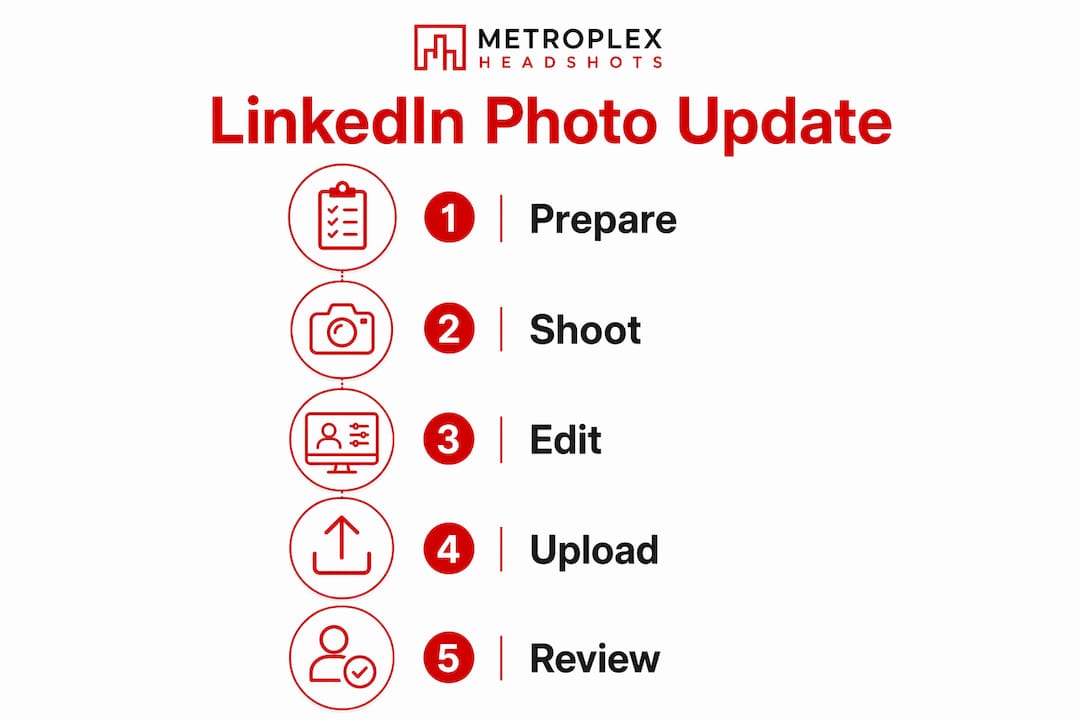
Changing your LinkedIn profile picture takes less than five minutes when you know the exact path through the interface. The process is the same on desktop and mobile, though the desktop version gives you more control over cropping.
- Log in to LinkedIn and click the Me icon at the top of the homepage.
- Select “View Profile” from the dropdown menu to open your profile page.
- Click the camera icon that appears over your current profile photo in the introduction section.
- Choose “Upload photo” from the options that appear. Select your prepared JPG or PNG file from your device.
- Use LinkedIn’s built-in editing tools to crop, zoom, and rotate the image. Center your face and confirm it fills the recommended portion of the frame.
- Preview the result in both the circular thumbnail and the full profile view before saving. LinkedIn shows you both.
- Click “Apply” to save your changes. Your new photo goes live immediately.
LinkedIn’s upload interface walks you through each step with on-screen prompts. If your upload fails, the most common causes are a file that exceeds 8MB or an unsupported format. Convert your image to JPG and reduce the file size using any free image compression tool before trying again.
Pro Tip: Check your photo on your phone after uploading. The mobile thumbnail is much smaller than the desktop view, and a face that looks well-framed on a laptop can appear too small on a smartphone screen.
For a deeper look at what separates a good photo from a great one, the LinkedIn headshot secrets guide covers composition and presentation in detail.
Why does a coordinated team photo update matter for small businesses?
A single strong profile photo builds your personal credibility. A consistent set of professional photos across your entire team builds brand trust at the company level. These are different things, and both matter.
A coordinated, professional look across all employee LinkedIn photos boosts trust and conversion rates when prospects research your company. Inconsistent or outdated photos weaken brand perception and reduce client confidence before a single conversation takes place.
The psychology is straightforward. When a prospect visits your company page and sees a mix of professional studio shots, casual selfies, and missing photos, they draw conclusions about your attention to detail and your culture. A unified set of photos communicates that your team operates with intention.
| Team photo approach | Effect on brand perception |
|---|---|
| Consistent professional photos across all profiles | Signals organization, credibility, and attention to detail |
| Mixed quality photos across profiles | Creates visual inconsistency that undermines trust |
| Missing photos on some profiles | Suggests incomplete or disengaged team presence |
Planning a team refresh is simpler than most small business owners expect. Book a single session for your full team, prepare a simple style guide covering attire and background preferences, and schedule everyone on the same day. The company-wide headshot guide from Metroplex Headshots walks through the logistics in detail. For broader context on why your online presence shapes client decisions, the small business online presence guide covers the full picture.
Key Takeaways
A professional, current LinkedIn photo is the single highest-return update a small business owner can make to their profile, directly increasing views, messages, and client trust.
| Point | Details |
|---|---|
| Meet technical specs first | Upload a JPG or PNG at 800×800 pixels, under 8MB, with your face filling 60–70% of the frame. |
| Expression builds trust | A genuine smile with visible eyes converts profile views into messages more reliably than a neutral expression. |
| Update every 18–24 months | Set a recurring reminder so your photo never drifts more than two years from your current appearance. |
| Team consistency amplifies credibility | Coordinated professional photos across all employee profiles strengthen brand perception at the company level. |
| Use LinkedIn’s built-in tools | Crop and preview your photo in the platform before saving to confirm it looks correct on both desktop and mobile. |
What I’ve learned from watching small businesses get their LinkedIn photos wrong
I’m Traci Schowmeyer, and after years of photographing small business owners for their LinkedIn profiles, the pattern I see most often is not a technical mistake. It is a confidence mistake. Owners show up to a session apologizing for how they look, convinced that the camera will expose something unflattering. That tension shows up in every frame.
The business owners who get the best results walk in with a clear idea of the emotion they want to project. Not a pose. An emotion. Approachable confidence reads completely differently from stiff professionalism, and clients feel that difference before they consciously register it.
The other mistake I see constantly is treating the photo as a one-time task. A photo taken five years ago does not represent who you are today, and it creates a jarring disconnect when a prospect meets you in person. That gap erodes trust at exactly the wrong moment.
Investing in a professional session every couple of years is not vanity. It is brand maintenance. Your photo is working for you every day on LinkedIn, on your website, and in email signatures. It deserves the same care you give your logo or your pitch deck. The networking impact of a strong headshot is measurable, and the cost of a weak one is just as real.
— Traci Schowmeyer
How Metroplex Headshots helps small business owners get LinkedIn-ready
A professional photo session with Metroplex Headshots is built around one goal: a photo that works as hard as you do.
Metroplex Headshots offers individual and team sessions designed specifically for small business owners who need a photo that reflects their brand, their personality, and their professionalism. Every session is guided to produce images that meet LinkedIn’s technical standards and hold up across every platform where your face represents your business. Whether you need a single updated portrait or a full team refresh, the process is straightforward and the results are built to last. See the difference between a professional headshot and a portrait to understand which session type fits your goals, and browse headshot photo examples to get a clear picture of what is possible.
FAQ
How often should I change my LinkedIn profile picture?
Update your LinkedIn photo every 18–24 months, or sooner if your appearance changes significantly. Regular updates keep your profile current and signal active engagement to your network.
What size should my LinkedIn profile photo be?
LinkedIn requires a minimum of 400×400 pixels and recommends 800×800 pixels for the sharpest display. The maximum file size is 8MB, and JPG or PNG formats are preferred.
Does a professional LinkedIn photo really make a difference for small businesses?
Yes. Profiles with a professional photo receive up to 21 times more profile views and 36 times more messages than profiles without one. For small business owners, that visibility directly affects client inquiries and networking outcomes.
What is the best background for a LinkedIn profile photo?
A neutral or subtly branded background keeps the focus on your face. Avoid busy patterns, outdoor distractions, or backgrounds that clash with your attire. A plain wall in a light, neutral color is the most reliable choice.
Can I update my LinkedIn photo on my phone?
Yes. Tap your profile photo, select the camera icon, and follow the prompts to upload and crop a new image. After saving, check the thumbnail view to confirm your face is well-framed in the circular crop that LinkedIn applies to all profile photos.

