


Your professional headshot belongs on every digital surface where a prospect, recruiter, or client might form a first impression. For websites, that means your home page, about page, team page, and contact page. For social media, it means LinkedIn, Facebook, Instagram, and your Google Business Profile. Consistent headshot usage across websites and social media is the single most direct way to build recognition, signal credibility, and turn a profile view into a real conversation.
Quick-reference placement guide:
- Home page: Lead with your face to anchor your personal brand immediately
- About page: Use a warm, approachable portrait that supports your story
- Team page: Consistent style across all team members builds collective trust
- Contact page: A professional photo reduces friction and humanizes the ask
- LinkedIn: Square crop, 400×400 pixels minimum, professional lighting
- Facebook and Instagram: Profile photo displays at 170×170 pixels on desktop
- Google Business Profile: Real photos of you and your team drive local engagement
- Twitter/X: 400×400 pixels, circular display crop, keep the face centered
Why professional headshots matter for your online presence
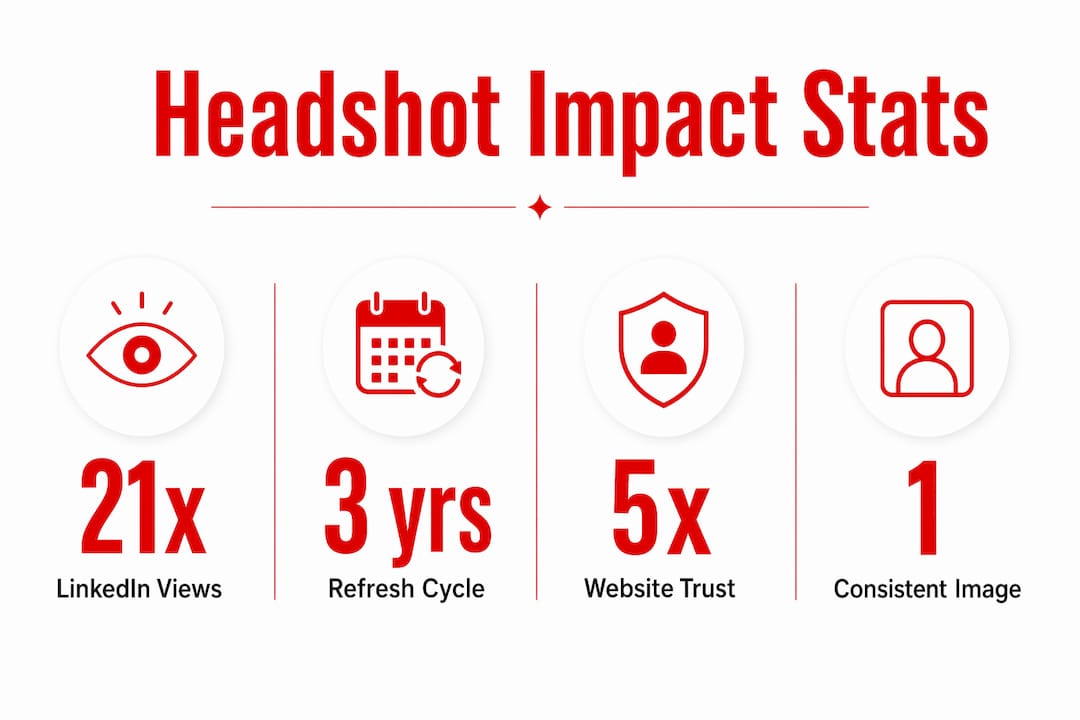
The numbers on this are not subtle. LinkedIn profiles with professional photos receive up to 21 times more profile views and 36 times more messages than profiles without photos. That is not a marginal edge. That is the difference between being found and being invisible.
The effect carries over to local search. Google Business Profiles with photos receive noticeably more requests for driving directions and more website clicks than those without them. Both of those actions sit directly before a purchase decision.
There is also a psychological dimension worth understanding. Eye-tracking research by Nielsen Norman Group found that visitors scrutinize photos of real people and skip past generic stock imagery as filler. When your website shows a real face, the “would I buy from this person?” test runs in your favor. When it shows only a logo, that test cannot run at all, and the prospect carries unresolved uncertainty into every comparison they make.
The quality threshold matters too. A Photofeeler analysis of over 60,000 headshots found that photos in the bottom 20% for competence and likability actively hurt credibility, performing worse than having no photo at all. A poor headshot is not neutral. It costs you.
How to use headshots effectively on different website pages
Your website is the trust hub of your personal brand, and each page serves a different function. Matching your headshot style to that function is what separates polished professionals from profiles that feel generic.
Page-by-page guidance:
- Home page: Place a confident, forward-facing portrait near your headline. Visitors decide within seconds whether to stay. Your face accelerates that decision.
- About page: Use a slightly warmer, more expressive image here. This is where your story lives, and the photo should feel like an extension of it.
- Team page: Standardize lighting, background, and crop across every team member. Inconsistency reads as disorganization, even when the individual photos are good. Company-wide headshot consistency is worth the coordination effort.
- Contact page: A friendly, approachable portrait here lowers the psychological barrier to reaching out.
For website specifications, deliver images as high-resolution JPEGs, typically 1000–2000 pixels on the long edge, with a compressed web version under 200KB for fast loading. A well-maintained website pairs current headshots with current copy. Visual drift, where your photo no longer matches how you look or what your brand communicates, undermines everything else on the page.
How to use headshots across major social media platforms

Each platform has its own technical requirements and audience expectations. Using the right crop and resolution per platform is not a minor detail. A pixelated or awkwardly cropped profile photo signals carelessness before anyone reads a word.
| Platform | Recommended size | Display shape | Best practice |
|---|---|---|---|
| 400×400 px minimum | Square/circle | Neutral background, professional expression | |
| 170×170 px (desktop) | Circle | Consistent with LinkedIn for brand alignment | |
| — | Circle | High contrast, face fills the frame | |
| Twitter/X | 400×400 px | Circle | Center the face; edges get cropped |
| Google Business | — | Square | Real photo of you or your team, not a logo |
LinkedIn rewards professional profile photos with dramatically higher visibility, as the 21x view statistic confirms. For Instagram, your profile image is tiny at actual display size, so a tight crop with strong contrast performs better than a wide shot. Google Business Profile is often overlooked for headshots, but showing a real face there builds the local trust that drives foot traffic and calls.
Pro Tip: Use the exact same headshot file across LinkedIn, your email signature, and your speaker bio page. Consistent visual identity across those three surfaces accelerates recognition faster than any other single tactic.
Tips for creating and selecting an effective professional headshot
The session itself is only part of the equation. What you bring to it, in terms of wardrobe, preparation, and intent, determines whether the final image actually works for your brand.
- Wardrobe: Dress one level above your typical workwear. Solid, mid-saturation colors like navy, charcoal, and jewel tones keep the focus on your face and photograph cleanly. Busy patterns and logos compete with your expression.
- Background: Neutral gray, white, or beige backgrounds are the most flexible. They age well and work across LinkedIn, press bios, and conference materials. A branded backdrop can work for team pages but looks promotional on LinkedIn.
- Expression: Aim for warmth without sacrificing polish. A slight, genuine smile reads as approachable and confident. A forced grin or a blank stare both undercut the professional impression you are building.
- Resolution: Request delivery in both high-resolution format for print and a web-optimized JPEG for digital use. Ask for square, portrait, and wide crops so you have the right version for every platform.
- Retouching: Light retouching for skin smoothing and color correction is standard. Heavy retouching that makes you unrecognizable creates a trust problem when you meet people in person.
Pro Tip: Schedule your haircut 7–10 days before your session, not the day before. A fresh cut can look stiff and unnatural in photos. A week of growth settles the style into something that photographs as polished rather than just trimmed.
For a full breakdown of what to wear for your session, Metroplex Headshots covers wardrobe choices by industry and role.
Research-backed insights and wardrobe guidance from Metroplex Headshots
The return on a professional headshot session is easier to calculate than most people expect. A typical professional headshot session cost amortized over a few years results in a modest monthly investment, covering LinkedIn, your website, email signature, press kit, and conference materials simultaneously. If that investment produces even one additional client conversation, the math resolves quickly.
Wardrobe choices at the executive level follow a distinct logic. Executive headshots typically use neutral backgrounds and a composed, authoritative expression rather than casual friendliness, because the visual cues need to communicate command before the viewer reads the title. For client-facing professionals in consulting, real estate, or financial services, the wardrobe goal is authority plus approachability, which is why jewel tones and structured blazers consistently outperform casual attire in perceived competence ratings.
Real team headshots on company websites also outperform stock photography for trust and conversions. Prospects are evaluating people, not placeholders.
When should you refresh your headshots?
Outdated headshots erode credibility faster than most professionals realize. People forgive an old phone number or a stale blog post more easily than a photo that no longer looks like you. The disconnect between your current appearance and your profile image creates a subtle but real trust gap, especially when someone meets you in person after seeing your photo online.
A practical refresh schedule: update your headshot every two to three years, or sooner after a significant change in appearance, role, or brand positioning. A promotion, a rebrand, a major speaking engagement, or a new business launch all justify a new session. Setting clear headshot goals before each session helps you get images that serve your next chapter, not your last one.
Deploying the same updated headshot across all platforms at once is the most efficient approach. Staggered updates create visual drift, where your LinkedIn photo looks different from your website, which looks different from your press bio. That inconsistency undermines the brand alignment you are working to build.
What effective headshot placement looks like in practice
The professionals who get the most mileage from their headshots treat them as a system, not a single asset. A LinkedIn profile with a clean, well-lit square crop and a consistent visual identity across the banner and featured section reads as intentional. An about page that pairs a warm portrait with a first-person narrative feels personal and credible. A Google Business Profile that shows a real owner photo alongside team images signals an active, trustworthy business.
For creative headshot ideas that go beyond the standard studio portrait, consider a working photo that shows you in your professional environment, a wider portrait with space for website hero text, and a candid image for social media and media kits. That mix gives you the right image for every context without needing a new session every time a placement opportunity comes up.
The pattern across high-performing profiles is consistent: one strong, current image used deliberately across every surface where trust is built before a conversation begins.
Key Takeaways
A professional headshot used consistently across your website and social media profiles is the highest-ROI trust signal available to any personal brand builder or professional.
| Point | Details |
|---|---|
| LinkedIn visibility | Profiles with professional photos receive up to 21 times more profile views and 36 times more messages than profiles without photos. |
| Google Business impact | Photos drive 42% more direction requests and 35% more website clicks for local businesses. |
| Refresh cadence | Update your headshot every 2–3 years or after a major role, appearance, or brand change. |
| Platform sizing | Deliver square, portrait, and wide crops so every platform gets the right format. |
| Metroplex Headshots | Provides professional headshot sessions with wardrobe guidance and multi-format delivery for consistent brand alignment across all platforms. |
Your next step with Metroplex Headshots
A polished headshot used across your website and social profiles is the digital handshake that precedes every client conversation. Metroplex Headshots works with professionals and personal brand builders who want images that reflect their actual authority, not just a photo taken on someone’s phone.
The approach at Metroplex Headshots is built around brand alignment. Every session is guided by your role, your industry, and the impression you need to make, from wardrobe selection to background choice to the final retouched deliverables. You walk away with a business portrait investment that works across LinkedIn, your website, your email signature, and every other trust surface in your professional life.
Ready to put a current, confident image in front of the people who matter most to your business? Book your session with Metroplex Headshots and get the headshots your brand deserves.

